Portal Says Invalid File Type but Your JPG Looks Fine

Key takeaways
- Every format starts with fixed signature bytes; the filename plays no part in identifying it.
- A DOCX detected as ZIP, or a JPG as JPEG, is normal and not a mismatch.
- A missing end marker means the file was truncated in transfer, and no tool can rebuild it.
- Fix a real mismatch with an actual conversion, then re-inspect the output before uploading.
- A passed structural check means intact, not safe; no malware scan is performed.
The scholarship portal wants a photograph as a JPG, under 200 KB. You have a JPG. It is 148 KB. You select it and the page throws back "Invalid file format" in red, three times in a row, and the last date for submission is Thursday.
The file is fine as a picture. It is just not a JPG, whatever its name says.
The extension is a claim. The first bytes are the evidence.
Every file format starts with a fixed sequence of bytes that identifies it — a signature, or magic number. Readers use it, not the name, to decide what they are looking at.
| Format | Starts with | Reads as |
|---|---|---|
| JPEG | FF D8 FF | not text |
| PNG | 89 50 4E 47 | .PNG |
25 50 44 46 | %PDF | |
| ZIP (and DOCX, XLSX, PPTX) | 50 4B 03 04 | PK.. |
The filename plays no part in this. Rename a photograph from photo.png to photo.jpg in Windows Explorer and you have changed nine characters of text; the bytes inside are byte-for-byte identical, and they still begin 89 50 4E 47.
Your gallery app opens it anyway, because desktop image viewers are forgiving and sniff the content. A government upload form is not forgiving. It checks the signature, sees PNG where the form asked for JPEG, and refuses.
How a file ends up with the wrong name
Nobody does this on purpose. It happens through a handful of very ordinary routes.
Someone takes a screenshot — Windows and most phones save those as PNG — and renames it to .jpg because the form asked for a JPG. A studio hands over a photo on a pen drive with the extension typed by hand. A file is downloaded from a WhatsApp Web session and lands with a name the server chose rather than the format it actually is. Or a well-meaning relative "converted" the file by editing the name in File Explorer, which changes nothing at all inside it.
Every one of those produces a file that looks correct in your folder and fails at the gate.
Confirm it in about ten seconds
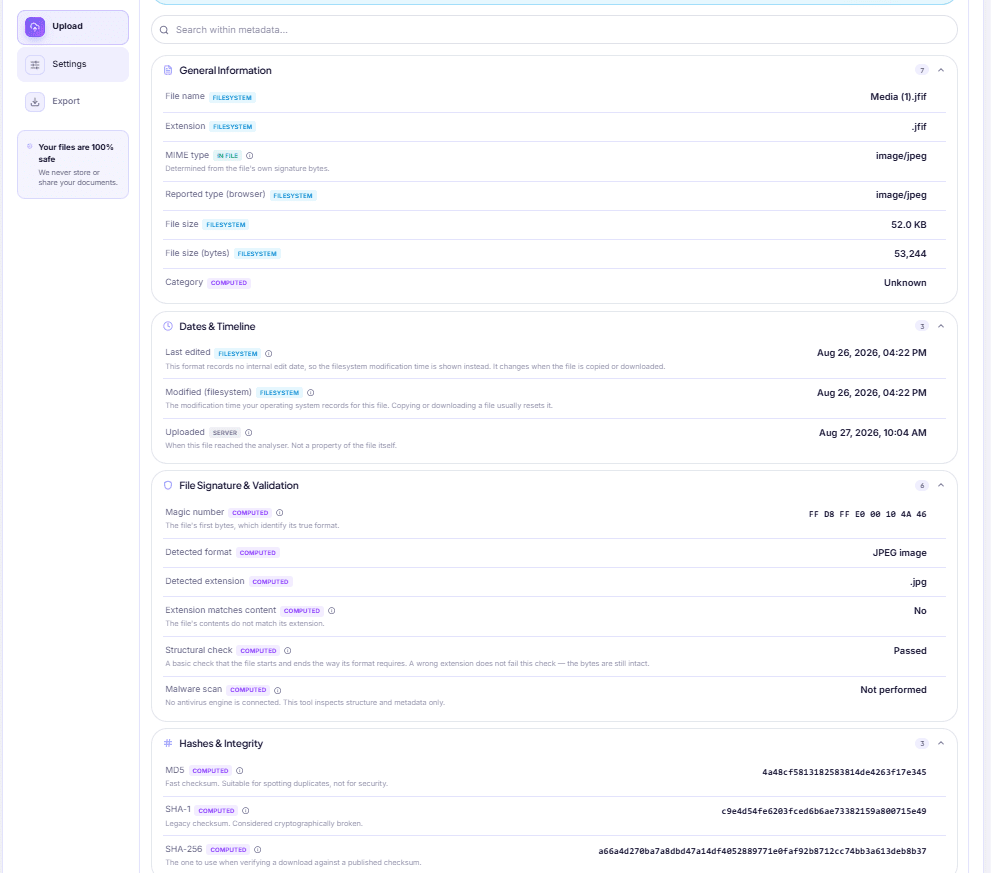
Drop the file into File Info and read the File Signature & Validation section. Four rows matter:
- Magic number — the leading bytes in hex, so you can see the evidence yourself
- Detected format — what those bytes actually identify, in plain words
- Detected extension — the extension the content implies
- Extension matches content — Yes or No
If that last row says No, an amber banner appears at the top of the report as well, saying the filename ends in one thing while the signature identifies another. That is your answer, and it took less time than one more failed upload attempt.
Not every mismatch is a mistake
Before you go rebuilding files, know that some perfectly healthy documents look mismatched at first glance, and the tool accounts for it.
Office documents are ZIP archives. A .docx, .xlsx or .pptx is a zip container holding XML files. Detecting "ZIP" for a .docx is correct, not a warning sign. Older .doc and .xls files are a different container again, Compound File Binary, and that is normal for their age.
JPG and JPEG are the same format. So are TIF and TIFF. A .jpg reported as jpeg is not a mismatch.
Plain text has no signature at all. A .txt or .csv file starts with whatever text is in it. Finding no signature there is expected — it is not evidence of a problem, and no warning is raised.
The mismatches that matter are the real ones: a PNG named .jpg, a JPEG named .png, an image named .pdf.
The other reason a portal refuses a file that looks fine
Sometimes the format is right and the file is simply incomplete.
Alongside the signature check, the report runs a structural check on the ends of the file, because that is where truncation shows:
- A PDF must finish with an
%%EOFmarker. If it is missing, you get "PDF may be truncated". - A JPEG must finish with its end-of-image marker,
FF D9. - Anything ZIP-based needs its end-of-central-directory record near the end of the file.
Missing tail bytes come from ordinary accidents — a download that stopped at 94%, a transfer interrupted when the phone ran out of storage, a copy pulled off a pen drive that was yanked out early. The file opens far enough to show you page one, so it looks healthy, and then the upload validator reads to the end and finds nothing there.
This one is worth being blunt about: no tool can repair it. The missing bytes are missing. Go back to whoever sent it, or to the source you downloaded it from, and get the file again.
There is one useful subtlety in how the check runs. It tests against what the file is, not what it is called. A PNG named .jpg is not truncated, and checking it for a JPEG end marker would wrongly report corruption — so when the signature identifies the format, that is what gets checked. A wrong name never produces a false corruption verdict.
Fixing a genuine mismatch
Renaming got you here, so renaming will not get you out. You need a real conversion, where the picture is decoded and written out in the target format.
Put the file through Image Converter and export it as JPG. Then — the step people skip — run the output back through File Info and check that Detected format now says JPEG and Extension matches content says Yes. Now upload it.
Two related situations come up constantly on the same forms:
"Upload your documents as a single PDF." Do not rename a JPG to .pdf. It produces a file that no PDF reader on earth will open, and the portal will reject it. Build a real PDF from your photographs with Images to PDF.
"Photo must be under 50 KB." Converting fixed the format but not the size. Bring it down with Image Compressor, then check the size in the report's General Information section — it shows both a readable size and the exact byte count, which is the number a strict validator is comparing against.
One thing the check does not tell you
The report includes a row reading Malware scan: Not performed, and it means exactly that. No antivirus engine is involved. The tool inspects structure and metadata, so a file that passes the structural check is intact, not safe. If the file came from someone you do not know, treat it with the same suspicion you would have before you inspected it.
The order that gets you through the form
- Inspect the file first, before you fill in anything else. Format and size are both in the first section of the report.
- Fix format before size. Converting a compressed file usually undoes the compression.
- Re-inspect the fixed file. Assume nothing.
- Upload.
That sequence turns a Thursday-evening panic into a five-minute job. Other small checks and fixers of this kind live under utilities, and the complete list is on the all tools page.
DocsSeva Team
Published on August 25, 2026 · Updated on October 2, 2026
Open the Utilities
Free, no sign-up, and your files are never stored.
Open the UtilitiesMore on utilities

Finding a File's Real Last-Edited Date, Not Today's
Your laptop says the forwarded quotation was modified today. It wasn't. Here is where a file's real dates live, which formats keep them, and what they prove.
Check If Your Photos Are Carrying Your Home Location
Marketplace photos can carry the coordinates of the room they were taken in. How to check a photo in seconds, what else is stored, and how to actually remove it.


In-Depth Comparison
Fast, Advanced or Compatibility: picking an OCR mode
What the three Advanced OCR recognition modes really change, why the Advanced option is sometimes greyed out, and how your device quietly sets the accuracy ceiling.