Send One Page of a 90-Page PDF, Not the Whole File


Key takeaways
- Extracted pages stay searchable and sharp; screenshots do not
- Count physical position, not the number printed on the page
- Check the Original / Extracted toggle before downloading
- A comma makes another file, not another page in the same file
- Extracting is not redacting; everything on the page still shows
HR needs the signed page. Not the offer letter, not the annexures — page 47, the one with the signatures on it. The file is 90 pages and 11 MB, and their mail server bounces anything over 10.
Or the landlord's bank wants the page of the rent agreement carrying both signatures and the stamp. Or the college wants the page of your statement showing the account holder's name, out of fourteen pages of Swiggy transactions.
Same job every time. Take one page out, send only that.
Why not just screenshot it
Because a screenshot is a picture of a document, and the difference shows.
The text stops being text. Nobody can search it, nobody can copy the account number out of it, and any system that reads uploaded documents automatically sees a flat image. Zoom in and the letters go soft, because you captured whatever your screen was showing rather than what the file contains. On a phone, you usually catch the toolbar too.
Pulling the page out with the Page Extractor copies the real page into a new PDF. Same fonts, same resolution, same crispness at 400% zoom. A scanned page stays exactly as sharp as the scan was. Nothing is re-rendered on the way through.
And the new file is small — one page of a 90-page document is usually a few hundred kilobytes, which solves the mail-size problem on its own.
The walkthrough, honestly
1. Add the file. The extractor takes PDFs up to 100 MB. Larger than that and the dropzone will tell you by name that the file exceeds the limit; that is the point to switch to the PDF Splitter, which handles up to 500 MB and does the cutting inside your browser instead.
2. Find the real page number. The canvas renders the document, and next to the filename in the Uploads card you get the total page count. Scroll to the page you want and count its position from the front of the file. Not the number printed at the bottom of the page — the position. Reports with a cover and a contents page put the page marked "1" at physical position 3 or 4, and that gap is where most wrong extractions come from.
3. Type it. One number, 47, in the Pages to extract box. The note under the field confirms what it read.
4. Extract, then look. Once it finishes, the canvas grows a two-button toggle: Original and Extracted. It lands on Extracted. Check it. Is the signature actually there, or did the signature block straddle a page break and you need 47-48? This is a ten-second check that prevents a "sorry, wrong page" email.
5. Download. For a single range the result comes back as one file with a button naming its size — Download extracted PDF · 380 KB. Nothing saves to your disk until you click it. The file arrives named extracted_pages_ plus your original filename, which you should rename before sending, because extracted_pages_Offer_Letter_Final_v3.pdf tells the recipient more about your folder habits than about the document.
One thing to know: the extractor uploads your file to DocsSeva's server to do the work and sends the new PDF back. For a public form or a manual that is irrelevant. For a bank statement, use the splitter instead — it never sends the document anywhere.
What to type for the usual asks
| What they asked for | Type this | You get |
|---|---|---|
| Just the signature page | 47 | One PDF, one page |
| Signature page and the one after | 47-48 | One PDF, two pages |
| The annexure from page 60 to the end | 60-9999 | Everything from 60 onwards, clamped to the real last page |
| Pages 3 and 47, separately | 3, 47 | Two PDFs, one per comma segment |
| Pages 3 and 47 in one document | 3, 47 then merge | Two files, joined afterwards |
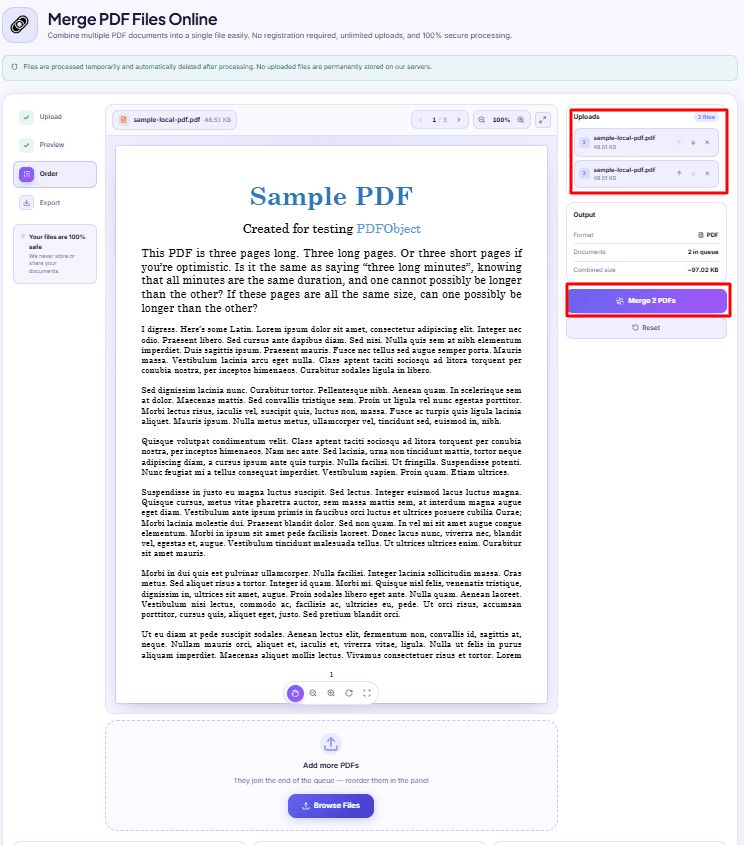
That last row is the limitation to have in your head. A comma does not mean "and put them together". It means "make another file". Each comma-separated segment becomes its own PDF and downloads on its own. If you need scattered pages inside one document, extract them separately and then join them — the merger's queue order becomes the page order.
Extracting is not redacting
This trips people up in exactly the situation where it matters.
Pulling page 4 out of a statement gives you page 4, complete, with every number on it. If your objection was to pages 1-3 and 5-14, you have solved your problem. If your objection was to the balance printed in the corner of page 4, you have not solved anything — the balance is still there, in a smaller file.
There is no setting in the extractor that blanks out part of a page, and a black rectangle drawn over text in most PDF editors can still be selected and copied underneath. Treat a page as all-or-nothing: send it whole, or do not send it.
What you can do is control who opens it. If the single page has to travel over email or WhatsApp and you would rather it not be readable by whoever forwards it next, the PDF Password tool encrypts a PDF with a password you choose — it takes files up to 25 MB, which a one-page extract will never come close to. Share the password over a different channel than the file.
If the one page is still too big
It happens with scans. A single page photographed at full resolution and dropped into a PDF can be 6 MB by itself, and extracting it does not shrink it — the page is copied across exactly as it was, which is the whole point.
The Output card shows you the final size before you download. If it is over what the portal or mailbox will take, run that one-page file through the PDF Compressor. Compressing a single page is fast, and because there is only one page, you can look at the result properly and decide whether the text is still comfortably readable.
Two habits worth keeping
Confirm the page before you extract, confirm the file after. The Original / Extracted toggle exists for this. Use it every time; it costs nothing.
Keep the original. The extractor never modifies your source file, so it is still sitting on your disk, all 90 pages of it. When the same office comes back next week asking for page 62 as well, you are one number away from sending it.
Everything else that cuts, joins, trims or reorders pages is listed on the all tools page.
DocsSeva Team
Published on August 31, 2026
Browse all tools
38 free document tools, no account required.
Browse all toolsMore on pdf-pages


Combine Aadhaar, PAN and Mark Sheets Into One PDF
A step-by-step way to turn phone photos, downloaded PDFs and cyber-cafe scans into one document bundle that fits a portal's 2 MB upload limit.


High-Intent Comparison
PDF Splitter vs Page Extractor: Which One Do You Need?
Two tools that take the same page numbers and produce similar files. The real difference is where the work happens, the size ceiling, and whether you see the result first.

Your Merged PDF Came Out in the Wrong Order? Fix It
Merged PDFs almost always come out jumbled for one reason: the queue order. Here is why filenames betray you and how to fix the sequence before you merge.